
One operating platform for every sale, table, kitchen, branch, and decision
Xnine POS connects front-of-house sales with inventory, production, kitchen execution, delivery, branch control, security, and Qube Analytics-powered business intelligence in one coordinated operating system.
 A QUBEFYN PRODUCT
If this sounds familiar, there is still a signal you cannot see.
Sales, stock, kitchen, delivery, and branch data live in disconnected workflows.
Network interruptions can break the flow between taking an order and completing it.
Managers need clearer signals about peak periods, table performance, and customer loyalty.
Capabilities that work together, not isolated tools.
Every component is designed to turn data or daily activity into a clearer decision your team can act on and review.
Smart point of sale
A clear, responsive selling interface for orders, payments, discounts, customer service, and day-to-day transaction control.
Online and offline continuity
Keep selling when connectivity is interrupted, then synchronize operational data with the cloud when the connection returns.
Inventory, production, and wastage
Connect ingredients, recipes, finished products, stock movement, production, wastage records, and low-stock alerts.
Restaurant execution
Coordinate KDS screens, QR ordering, tables, waiters, delivery, menus, and smart printer routing from the same platform.
Multi-branch control and security
Manage branches centrally with role-based permissions, a complete audit trail, and optional two-factor authentication.
Business intelligence by Qube Analytics
Turn POS activity into Sales Heatmaps, Tables Heatmaps, and RFM customer segments that support operational decisions.
A few steps, with context that stays connected.
- 01
Configure the operation
Set up products, categories, recipes, menus, prices, branches, users, permissions, and the devices your team will use.
- 02
Connect every service point
Route orders between checkout, waiters, QR menus, kitchen displays, delivery workflows, and the correct printers.
- 03
Operate, measure, and improve
Run daily service, review consolidated reports, and use Qube Analytics-powered intelligence to improve staffing, tables, inventory, and customer engagement.
From the first order to the final branch report
Xnine keeps the operational flow connected so each team works from the same order, stock, customer, and branch context.
Smart POS
Process sales through a fast interface designed for restaurant and retail workflows, with products, modifiers, offers, payments, and customer details available at checkout.
Online and offline synchronization
Continue operating through a connectivity interruption and synchronize captured activity when internet access returns, keeping local work connected to cloud reporting.
Multi-branch management
Use a central dashboard for branch oversight, consolidated reporting, stock transfers, and branch-specific menus or pricing where the operation requires them.
Waiter and delivery workflows
Support tables and zones, waiter-facing order entry, delivery order handling, and external delivery integrations without separating them from the core POS workflow.
Know what you have, what you make, and what is being lost
Xnine connects selling activity to the production cycle so inventory reflects how ingredients and products actually move through the business.
Real-time inventory tracking
Follow item quantities and stock movement as sales, purchases, transfers, returns, and production activity take place.
Production recipes
Define how raw materials become prepared or finished products so production consumption is tied to the correct recipe and quantity.
Wastage and loss records
Record wastage separately from sales and production to preserve a more accurate view of stock and operational loss.
Automatic stock linkage and alerts
Link inventory to production and receive low-stock signals before a shortage disrupts service.
Xnine POS analytics for branches and sales operations — original product view 1
Move every order through the right screen, station, and printer
Coordinate ordering and preparation across customers, cashiers, waiters, kitchen teams, delivery staff, and service stations.
Kitchen Display System (KDS)
Present incoming orders to the kitchen in an organized view with status cues that help the team manage preparation and handoff.
Interactive QR menu
Let customers browse products, see current prices and offers, and place orders from their phones without downloading an application.
Multiple menus and modifiers
Create menus for different times or channels, assign their own pricing, and manage required or optional modifiers for each product.
Smart print routing
Automatically send grill items to the grill printer, drinks to the bar, and receipts to checkout, with a log for failed jobs and recovery.
Xnine POS analytics for branches and sales operations — original product view 2
Give every person the access they need—and a traceable record of what changed
Operational control is built around clear user access and an audit trail for sensitive actions.
Role-based permissions
Define permissions by user so cashiers, waiters, supervisors, managers, and administrators see and control the functions appropriate to their responsibilities.
Complete audit log
Review sensitive actions such as invoice cancellation or cash-drawer access and identify the user responsible for each event.
Two-factor authentication
Add a second authentication factor to strengthen access protection for management and other privileged accounts.
Central branch oversight
Keep branch performance, users, inventory movement, and operational settings visible to authorized managers from one control layer.

Xnine POS analytics for branches and sales operations — original product view 3
Business intelligence that explains the rhythm behind the totals
Xnine extends standard reporting with visual and customer intelligence designed to turn daily POS data into clearer operating decisions.
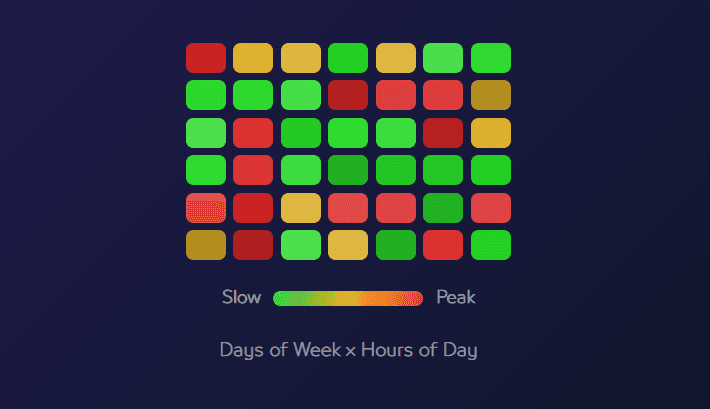
Sales Heatmap
Map days of the week against hours of the day with color-coded demand levels. Use the pattern to review staffing, inventory preparation, and promotion timing around peak and quieter periods.
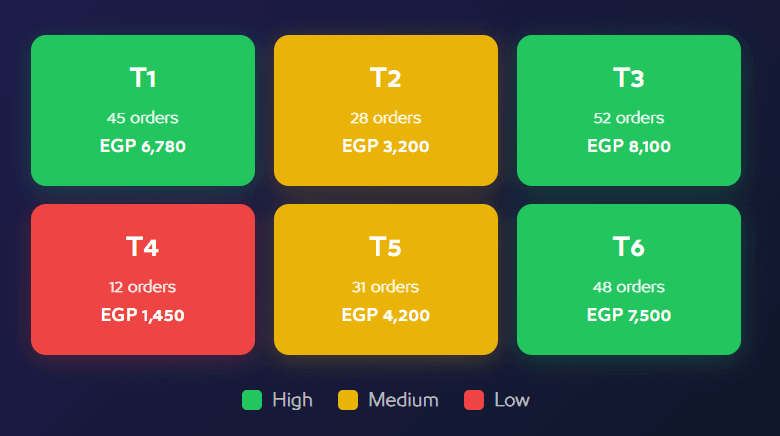
Tables Heatmap
View table performance on an interactive floor plan using order count, revenue, average order value, occupancy time, and performance relative to the restaurant average.
RFM customer analysis
Segment customers by recency, frequency, and monetary value to distinguish champions, loyal customers, new customers, at-risk groups, and customers who may need reactivation.
Operational connections
Relate intelligence to reports, staffing, offers, inventory planning, table zones, loyalty, QR menus, and marketing exports instead of treating analysis as a separate dashboard.
Shared value, in every team's language.
Let us connect the challenge to the right solution.
A short session to understand the context and identify the first experiment that can demonstrate real value.