
Monthly capacity that grows with your operation
Choose the transaction, review, branch, and support level that fits your current operation, with a clear path from a first location to a managed multi-branch business.
 A QUBEFYN PRODUCT
A strong foundation in every option.
Every component is designed to turn data or daily activity into a clearer decision your team can act on and review.
Clear monthly pricing
Compare four monthly tiers using published branch, transaction, and review capacity.
A direct growth path
Move from a first branch to a larger operation without replacing the underlying POS workflow.
Support that scales
Basic adds priority support, Professional adds a dedicated account manager, and Business adds an SLA guarantee.
A clear plan, with room to grow.
Final pricing depends on scale, integrations, and infrastructure requirements. We define these with you before any commitment.
Starter
For restaurants, cafes, supermarkets, and other businesses at the beginning of their POS journey.
- Unlimited products
- 1 branch
- Unlimited categories
- 5,000 transactions per month
- 500 reviews
Basic
For growing businesses that need unlimited monthly transactions and faster support.
- Unlimited products
- 1 branch
- Unlimited categories
- Unlimited transactions per month
- 1,000 reviews
- Everything in Starter
- Priority support
Professional
For established operations that need two branches, unlimited reviews, and guided account support.
- Unlimited products
- 2 branches
- Unlimited categories
- Unlimited transactions per month
- Unlimited reviews
- Everything in Basic
- Dedicated account manager
Business
For larger operations that need three branches and an enterprise-level service commitment.
- Unlimited products
- 3 branches
- Unlimited categories
- Unlimited transactions per month
- Unlimited reviews
- Everything in Professional
- SLA guarantee
Choose by the limits that matter to daily operation
The published plans scale through branch count, monthly transaction capacity, customer review capacity, and the level of support attached to the account.
Starter
One branch, 5,000 transactions per month, and 500 reviews for an operation establishing its core POS workflow.
Basic
One branch with unlimited monthly transactions, 1,000 reviews, everything in Starter, and priority support.
Professional
Two branches, unlimited transactions and reviews, everything in Basic, and a dedicated account manager.
Business
Three branches, unlimited transactions and reviews, everything in Professional, and an SLA guarantee.
Pricing sits on top of a connected Xnine operating platform
Plan selection defines commercial capacity, while implementation can bring together the POS, stock, kitchen, customer, branch, and control workflows your business needs.
Sales continuity
Use a smart POS with online and offline synchronization so checkout activity can continue through connectivity interruptions and synchronize afterward.
Inventory and production
Connect sales to stock, recipes, production, wastage, transfers, and low-stock monitoring.
Kitchen and service flow
Coordinate KDS, QR menus, waiters, tables, delivery, menus, and smart print routing around one order record.
Governance and security
Control access with user permissions, review sensitive actions in the audit log, and enable two-factor authentication for protected accounts.
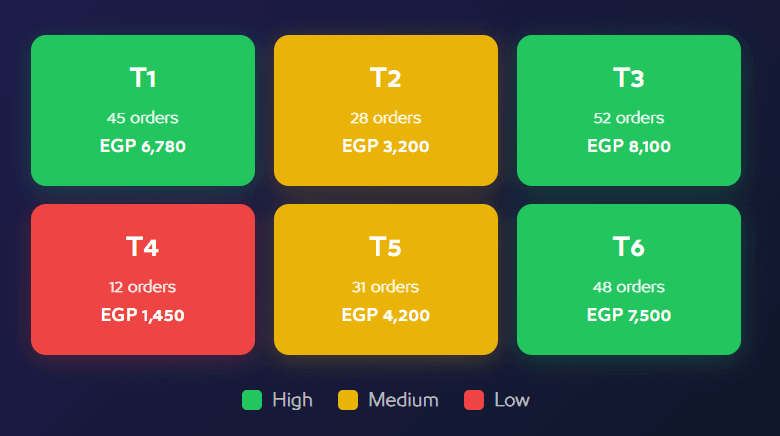
Business-intelligence capabilities available with Xnine POS — original product view 1
Advanced intelligence is positioned for Professional and above
Current Xnine feature pages position Sales Heatmap, Tables Heatmap, and RFM customer analysis in the Professional tier and above. Confirm final entitlement during ordering if your rollout has custom requirements.
Sales Heatmap
Visualize demand by day and hour to review shift coverage, inventory readiness, and promotion timing.
Tables Heatmap
Compare table performance through orders, revenue, average order value, occupancy time, and relative performance.
RFM customer analysis
Segment customers by recency, frequency, and monetary value to support loyalty, retention, and targeted outreach.

Business-intelligence capabilities available with Xnine POS — original product view 2
Confirm the operating details that shape your rollout
A useful plan decision also considers devices, branch setup, invoicing requirements, data configuration, team enablement, and the support model you expect.
Devices and service points
Map the tablets, mobile POS devices, cashier stations, kitchen displays, and printers that will participate in each branch workflow.
Branch and catalog setup
Define products, categories, menus, pricing, recipes, stock locations, roles, and reporting visibility before go-live.
Electronic invoicing
Electronic invoicing is offered on request, with implementation readiness described for Saudi Arabia and Egypt; confirm the exact market configuration with the Xnine team.
Training and support
Align onboarding materials, team training, priority support, account management, or SLA expectations with the selected plan.
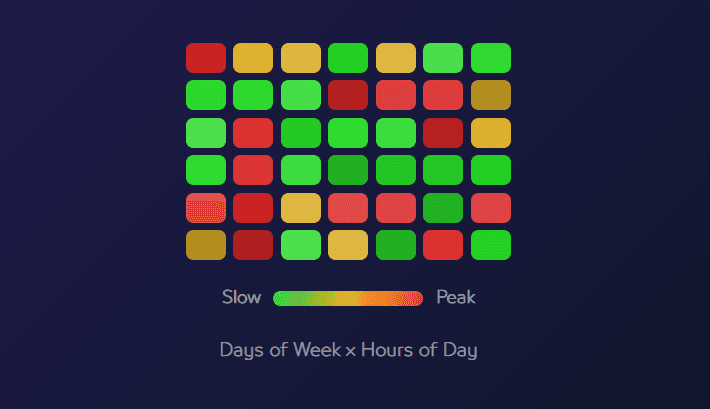
Business-intelligence capabilities available with Xnine POS — original product view 3
Practical answers before choosing an Xnine plan
Clarify branches, reporting, evaluation access, support, training, invoicing, devices, and security before rollout.
01Can Xnine POS be used for more than one branch?+
Yes. Multi-branch plans let you manage branches from a centralized dashboard with synchronized data. The published monthly plans include one branch in Starter and Basic, two in Professional, and three in Business.
02How can I track sales and profits?+
Use the management dashboard and detailed reports to follow sales, expenses, profitability, products, and branch performance. Qube Analytics-powered intelligence adds visual views for demand and table performance where included.
03Is there a trial or evaluation period?+
Xnine promotes evaluation access, but the duration shown across current pages is not consistent. Confirm the active trial or promotional terms with the team before relying on a specific period.
04Is technical support available when needed?+
Yes. Support is available, with priority support listed in Basic, a dedicated account manager in Professional, and an SLA guarantee in Business.
05Do I need special training to use the system?+
Xnine is designed around a clear operational interface. Training sessions and educational materials can support configuration, role-specific workflows, and team adoption.
06Does Xnine support electronic invoicing?+
Electronic invoicing is available on request, and the current pricing information describes implementation readiness for Saudi Arabia and Egypt. Confirm the exact compliance and configuration scope for your market.
07What sales analytics does Xnine POS provide?+
Reporting covers areas such as top-selling products, peak periods, average order value, and branch performance. Advanced intelligence adds Sales Heatmap, Tables Heatmap, and RFM customer analysis in eligible plans.
08Does the system support tablets and mobile POS devices?+
Yes. Xnine is designed to work across different device types, including tablets and mobile service points, so teams can adapt the setup to checkout, waiter, and branch workflows.
09How does Xnine protect business and customer data?+
The platform uses access controls and modern encryption practices, and includes role-based permissions, an audit log for sensitive operations, and optional two-factor authentication for stronger account protection.
Let us connect the challenge to the right solution.
A short session to understand the context and identify the first experiment that can demonstrate real value.